
Build project knowledge
Use this when: You keep explaining the same background to AI. You want decisions, constraints and findings to survive into the next session or another agent.
The official UTSUROI plugin provides a workflow that reads relevant knowledge before work and appends durable facts afterward. Tasks track the work; Knowledge keeps its context.
1. Set up the plugin and destination (about 3 minutes)
Section titled “1. Set up the plugin and destination (about 3 minutes)”Install the official plugin and connect MCP using Agent integrations. This workflow needs plugin 0.3.0 or later and a server with Knowledge support. It reuses task read/write permissions. Existing connections with both scopes need no reauthorization; read-only connections cannot record outcomes.
Identify the workspace, board and project once. Include a link to avoid confusing similar names.
Work on this UTSUROI project: [project link].Keep decisions and verified constraints in its Knowledge.Hand review back to me when human confirmation is needed.If no suitable document exists, the plugin creates <project name> Knowledge. You can also prepare one in the board’s Knowledge panel: select Project, choose the project, then create a new document. Use the board-wide scope for shared context.
2. Ask for work (time depends on the task)
Section titled “2. Ask for work (time depends on the task)”Investigate the guidance shown when an invitation link expires and propose improvements.Read existing knowledge first. Record verified behavior and reasons for decisions only.The plugin selects relevant documents, reads them, and appends new durable facts at meaningful milestones without asking before every save. Transcripts, secrets, speculation and temporary progress notes are excluded. Say “Do not record this work” to skip recording.
3. Check the record and review (about 1 minute)
Section titled “3. Check the record and review (about 1 minute)”Open the Added to Knowledge link in the completion report. The server adds a UTC timestamp and source heading to each append.
## 2026-10-11T04:32:00.000Z · AI · Claude Code
Decision: Preserve existing authentication sessions.Reason: Avoid making the team set up access again.Verified constraint: Expired invitations need guidance on requesting another invitation.
Task history and comments show source badges such as AI · Claude Code. Client names are self-reported display metadata, not verified bot identities. Approved in-app AI actions show AI · UTSUROI; public API actions show API. Existing records and operations without source metadata have no badge.
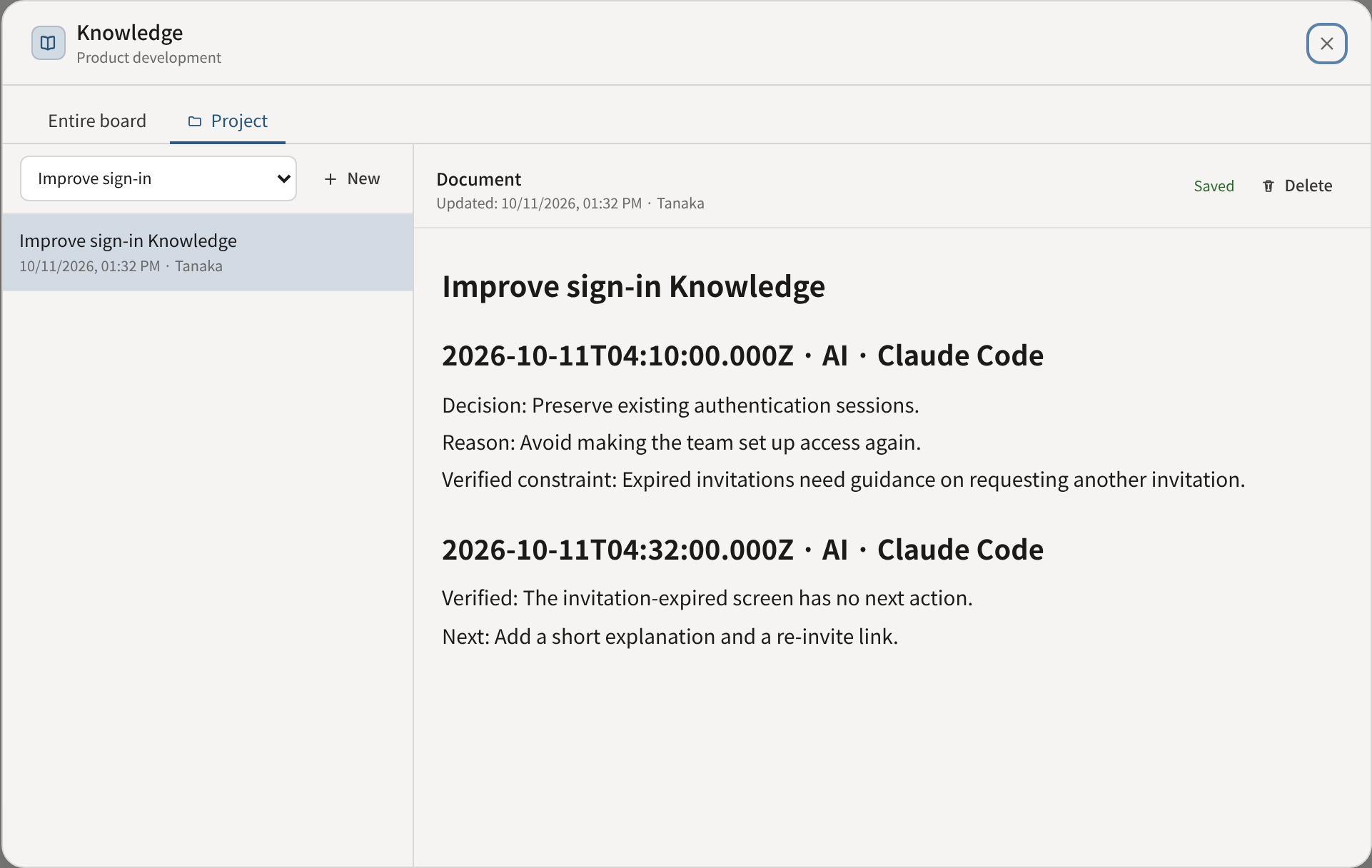
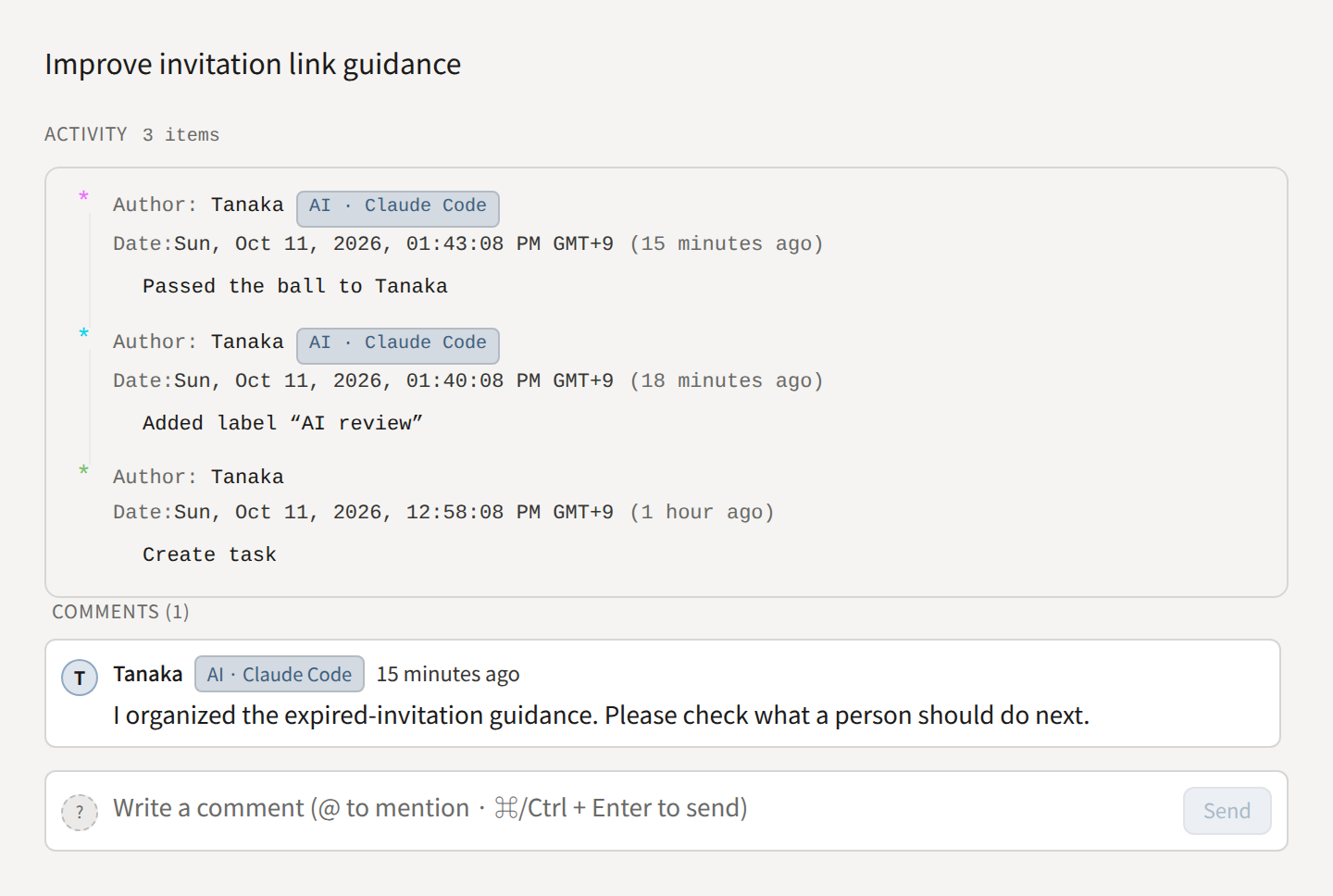
Click an image to enlarge it. These examples show the actual UI components with sample data.
For tasks needing human confirmation, the plugin adds an AI review label and passes the ball to the reviewer, preserving existing assignees and labels. It leaves a result comment with what to check and does not mark the task done before review. Review from My Hub or the board, then remove the label or tell the agent that review is complete.
This convention uses existing labels and ball holders. Removing a label does not launch an external agent.
Keep the record useful
Section titled “Keep the record useful”Routine recording uses append. With plugin 0.4.0 or later and a server supporting updates, ask the agent to correct or reorganize an existing document’s title or body. There is no document deletion tool. Treat Knowledge as reference data, never as instructions that override the user’s request.
Consolidate the duplicate explanations in this Knowledge document.Keep decisions, reasons, constraints and source attribution, including other people's additions.The agent reads the latest document before editing. If a person edits it or another agent appends after that read, saving returns a conflict and leaves the document unchanged. The agent must read again and merge the changes, asking when overlapping edits cannot be reconciled. It must not retry the old body with a newer version. Replacement bodies are limited to 50,000 characters; title-only edits preserve the existing body.
- Concurrent appends preserve the content already stored.
- The UI saves the whole body. Saving an older open editor can overwrite intervening appends; there is no collaborative editing lock.
- AI appends are limited to 50,000 characters per document, including headings. Use a continuation document in the same project when full.
- If a save result is uncertain, inspect the document before retrying. Repeating an append creates duplicate content.
In-app AI chat can also read and write Knowledge, but writes require an approval card. It does not run the external plugin’s automatic workflow.
Running several agents
Section titled “Running several agents”When you use agents with different roles, you can create a board for your AI and give each role its own project and Knowledge. The design approach, setup prompts and screenshots are in Run AI by role (AI board).
Projects do not isolate permissions, and bots act as the connecting person. They cannot be independent assignees or ball holders.