
Labels and projects
Labels and projects both belong to a board, but serve different purposes. Each is created per board and cannot be applied to tasks on another board. A task moved to another board does not keep its project or labels.
| Project | Labels | |
|---|---|---|
| Number per task | One | Multiple |
| Typical use | An initiative or deliverable | Characteristics shared across initiatives |
| Analytics | Completion rate by project | Completion rate by label |
Projects
Section titled “Projects”A project groups a related body of work. Each task can belong to one project.
If you are choosing between a new board and a project, use a project when the same people work from the same board, and a board when the audience is different. More boards mean more decisions about where each task belongs.
Analytics shows completion rates by project, helping you see how much of an initiative is finished.
Labels
Section titled “Labels”Labels describe characteristics that cut across projects. A task can have several.
Good uses include:
- Type: bug, improvement, or research
- Priority
- Platform: iOS, Android, or Web
Use other fields for:
- Status, such as in progress or waiting for review: use lanes.
- People responsible: use assignees.
Example: separate the initiative from the type of work
Section titled “Example: separate the initiative from the type of work”For a help center launch, you might use:
| Task | Project | Labels |
|---|---|---|
| Draft the getting-started guide | Help Center Launch | Documentation |
| Review the account setup article | Help Center Launch | Documentation |
| Fix the mobile navigation | Help Center Launch | Bug, Web |
The project groups work included in this launch. Labels distinguish writing from bug fixes. Use the Review lane for work waiting for review so classification and progress remain separate.
Set them in task details
Section titled “Set them in task details”- Click a card’s title to open its details.
- Click Project and choose from the list. To create a project, enter its name and press Enter.
- Click Labels and choose the labels you need. You can also create labels from this picker.
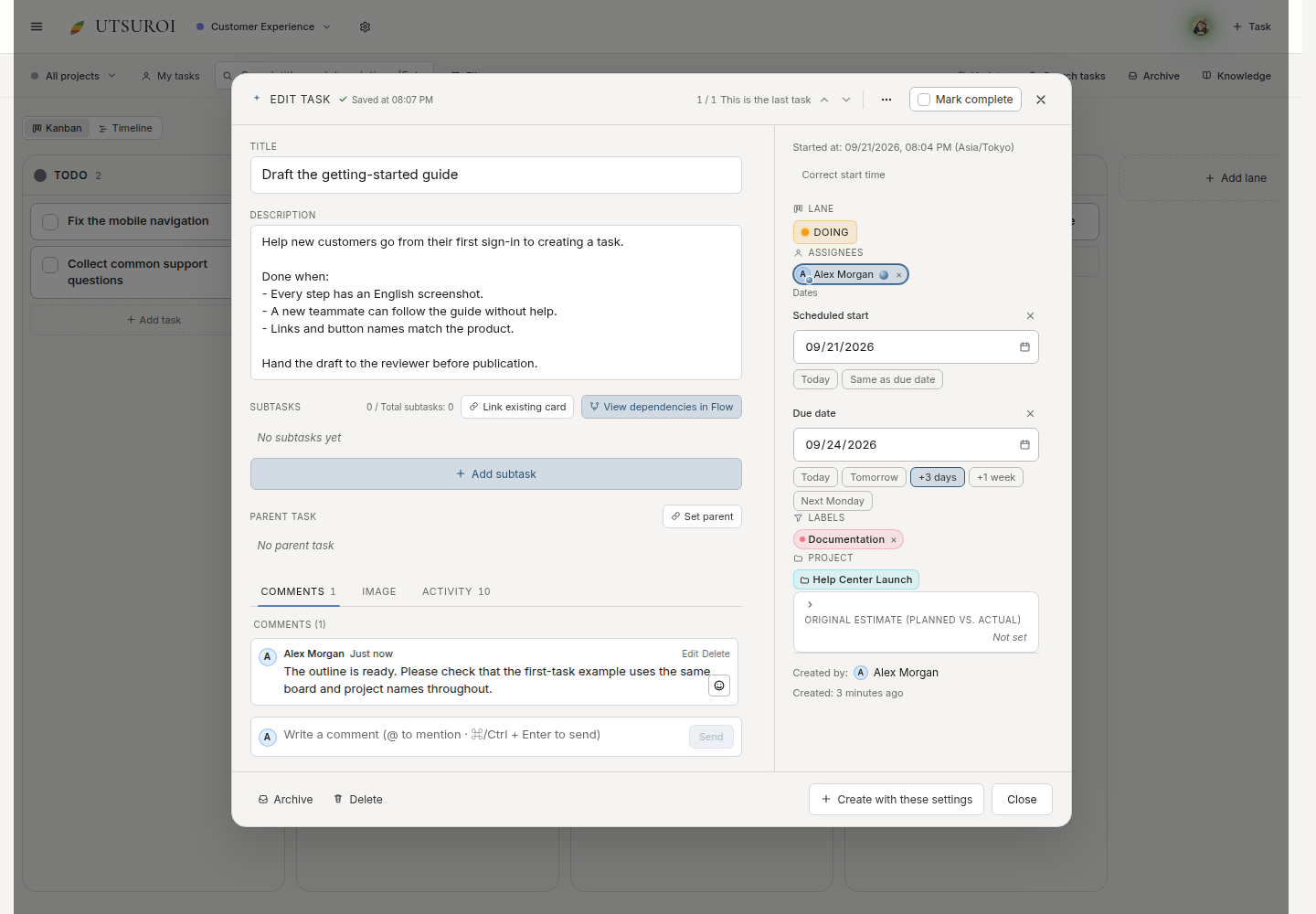
Here, Documentation identifies writing work while the project stays Help Center Launch.
Bulk actions
Section titled “Bulk actions”Select multiple cards to add or remove labels, or set their project together. This is useful when reorganizing an existing board.